LinkedIn Jobs workflow, cleaned up

Hide the jobs you have already seen.

Privacy-first LinkedIn Jobs userscript that hides or highlights viewed job cards, preserves SPA compatibility, and includes scroll guard protections. Keep the queue readable, preserve soft SPA navigation, and stay local-only while the script tracks viewed and applied job cards across multilingual LinkedIn markers.

Privacy-first and local-only Stable on LinkedIn Jobs SPA routes High-confidence multilingual detection
Live job queue control Compact badge, guard controls, and color modes
README-backed demo
Screenshot of the badge and hidden jobs
Mode Hide and highlight
Guard Cooldown aware
State Persistent preferences
Approach Client-side only with no telemetry and no external calls
Routes Built to stay stable on LinkedIn Jobs SPA transitions
Detection Viewed and applied matching across 15+ languages
Control Draggable badge, toggles, colors, and active-card accent
Built for job search rhythm

A landing shell that feels closer to the product it supports.

The page now leads with a lighter, section-based marketing flow instead of a single dark documentation slab. The repository still owns the content, but the presentation now mirrors the pacing, spacing, and confidence of a LinkedIn-style landing page.

1

Faster visual scan

Large headline, restrained blue accents, and open spacing make the page feel more like a product destination than a README wrapper.

2

Hybrid information architecture

Top sections sell the value proposition, while the full markdown documentation stays intact below for install, usage, and detection details.

3

Repository identity preserved

The design language moves closer to LinkedIn marketing pages without copying their trademark assets or replacing the project brand.

Explore what it handles

The script stays focused on the awkward parts of job triage.

It is not a giant automation layer. It is a clean control surface for people who just need LinkedIn Jobs lists to stay readable while they scroll, compare, and apply.

Viewed markers Applied markers Hide mode Highlight mode SPA refresh stability Scroll guard Badge persistence Multilingual keywords Active card accent

Keep the landing polished. Keep the docs real.

The site now acts like a proper product page up top and a full project reference down below. That keeps the public face sharper without moving feature details out of the repository workflow.

Documentation

Everything below still comes from the repository README.

Install steps, supported languages, usage notes, and project links remain markdown-driven so the public page and repository docs do not drift apart.

LinkedIn Hide Viewed Jobs

Hide or highlight viewed job postings on LinkedIn Jobs with a privacy-first userscript built for Tampermonkey and Violentmonkey.

This project focuses on three things: stable LinkedIn SPA behavior, high-confidence multilingual viewed/applied detection, and safer scrolling with guard and cooldown protections.

Screenshot

Screenshot of the badge and hidden jobs

Features

  • Dynamic Control:
    • ON/OFF status toggle.
    • Guard (ON/OFF): Scroll protection to prevent LinkedIn rate-limits. This is especially important when hiding jobs, as rapid scrolling through hundreds of hidden items can trigger bot-detection filters.
  • Two-Layer Detection:
    • Hide Mode: Automatically vanishes viewed jobs.
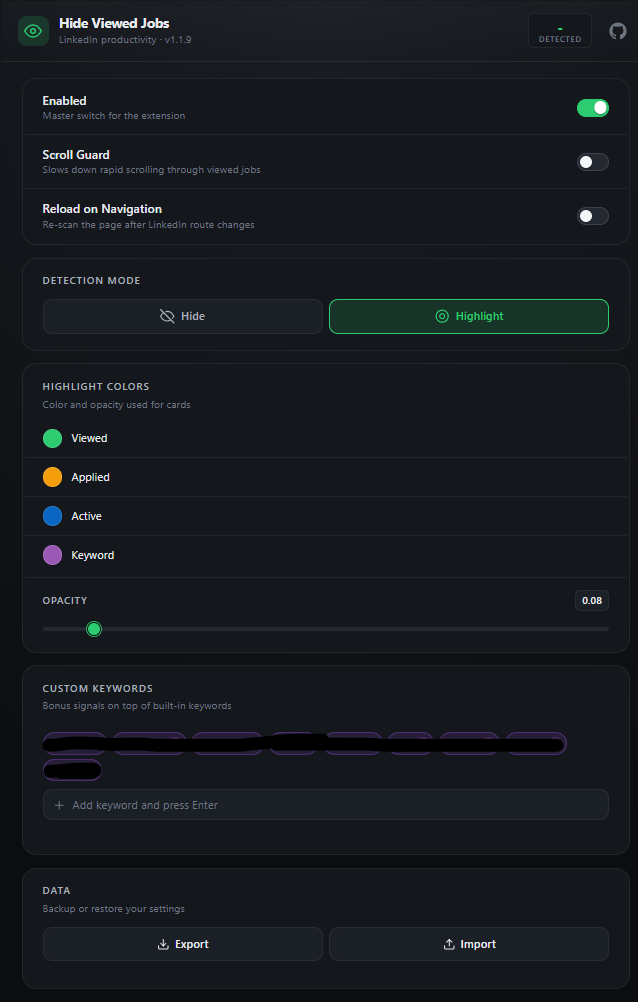
    • Highlight Mode: Keeps jobs visible but adds separate low-opacity full-card color filters for viewed and applied cards.
  • Active Card Accent: On jobs and jobs/search views, the currently open job card gets its own configurable highlight filter color so the selected row stays easy to spot.
  • Draggable Handle: Reposition the badge anywhere on the screen.
  • Dynamic Settings Panel: Expandable menu to switch between Hide and Highlight modes, tune viewed, applied, and active card colors, adjust filter opacity, and open the GitHub repository.
  • Navigation Reload Toggle: Choose whether SPA path changes should trigger a full page reload or stay on soft refresh.
  • Live Counter: Track N viewed or N hidden items in real-time.
  • Persistence: Remembers your preferences for ON/OFF, Scroll Guard, Detection Mode, Navigation Reload, Viewed/Applied/Active Colors, Filter Opacity, and Badge Position.
  • Robust Navigation: Full support for LinkedIn’s SPA routing; automatically restarts scanning when you switch pages or collections.
  • Multilingual: Intelligent keyword detection across 15+ languages.

Supported Pages

  • https://www.linkedin.com/jobs/*
  • https://www.linkedin.com/jobs/search/*
  • https://www.linkedin.com/jobs/collections/*

Browser Compatibility

  • Chrome + Violentmonkey/Tampermonkey
  • Edge + Violentmonkey/Tampermonkey
  • Firefox + Violentmonkey/Tampermonkey

Installation

  1. Install a userscript extension in your browser:
  2. Chrome/Edge: Tampermonkey or Violentmonkey
  3. Firefox: Tampermonkey or Violentmonkey
  4. Import linkedin-hide-viewed-jobs.user.js into the extension.
  5. Save and enable the script.
  6. Refresh a LinkedIn Jobs page.

Alternative:

  • Install directly from @downloadURL:
  • https://raw.githubusercontent.com/sametcn99/linkedin-hide-viewed-jobs/main/linkedin-hide-viewed-jobs.user.js

GitHub Pages

This repository includes a GitHub Pages setup that renders this README through Jekyll with a polished dark editorial layout, a branded hero section, and responsive documentation styling.

Included site assets:

  • manifest via icons/site.webmanifest
  • robots.txt
  • sitemap.xml
  • favicon and Apple touch icon links from icons/
  • Open Graph, Twitter, canonical, and JSON-LD metadata

Publish flow:

  1. Open repository settings on GitHub.
  2. Go to Pages.
  3. Set Build and deployment to Deploy from a branch.
  4. Select the master branch and /(root) folder.
  5. Save.

Published site URL:

  • https://sametcn99.github.io/linkedin-hide-viewed-jobs/

Supported Languages

The script supports detection for the following languages:

  • English (Viewed, Seen, Applied)
  • Turkish (Görüntülenen, Görüntülendi, Başvurulan, Başvurulanlar, Başvuruldu)
  • Spanish (Visto, Vistos, Aplicado, Postulado)
  • Portuguese (Visualizado, Visualizados, Candidatado, Candidatura)
  • French (Vu, Vue, Postulé, Postulée, Candidature)
  • German (Angesehen, Gesehen, Beworben)
  • Italian (Visualizzato, Visto, Candidata, Candidati, Candidatura)
  • Dutch (Bekeken, Solliciteerd)
  • Russian (Просмотрено, Откликнулся)
  • Polish (Wyświetlono, Aplikowano)
  • Swedish (Visad, Sedd, Sökt)
  • Chinese (已查看, 已申请, 已檢視, 已申請)
  • Japanese (閲覧済み, 応募済み)
  • Korean (조회됨, 지원함, 지원 완료)
  • Arabic (تمت المشاهدة, تم التقديم)
  • Hindi (देखा गया, आवेदन किया गया)

Usage

  1. Open a LinkedIn Jobs listing page.
  2. The script scans for viewed cards.
  3. When OFF, viewed jobs are not hidden; they are only counted.
  4. When ON, viewed jobs are hidden.
  5. In settings, Reload OFF is the default. SPA navigation stays on soft refresh unless you explicitly enable Reload ON.
  6. In Highlight mode, Viewed and Applied cards use different colors so you can distinguish them at a glance.
  7. On jobs and jobs/search pages, the currently selected card also gets its own full highlight filter color.
  8. In settings, use the native color pickers to adjust Viewed, Applied, and Active card colors, and use the opacity slider to make the highlight filter lighter or stronger.
  9. The settings panel includes a direct GitHub Repo shortcut for the project source and issue tracker.
  10. If rapid downward scrolling is detected while most cards are viewed/hidden, the guard can enter a random cooldown (5-15s) and slow scroll steps to reduce LinkedIn rate-limit risk.
  11. If guard is triggered again while a cooldown is already active, the new cooldown is added on top of the remaining time (stacked), instead of restarting as separate back-to-back cooldowns.
  12. During cooldown, pagination controls inside div.jobs-search-pagination are temporarily disabled (including collections/search pagination buttons).
  13. Drag the badge using the handle on the left to reposition it.

Detection Logic

The script performs detection in multiple layers:

  • Card selectors: li[data-occludable-job-id] and related LinkedIn list item selectors
  • Footer/marker-focused detection (VIEWED_MARKER_SELECTORS)
  • Text, aria-label, and title checks inside each card
  • Card-level fallback scan for missed cases

Text matching uses normalize('NFD') plus diacritic removal for more stable multilingual matching.

Customization

Source-of-truth customization lives under src/** and the userscript bundle is generated from that source.

Common knobs:

  • VIEWED_KEYWORDS: Add more viewed-language phrases
  • APPLIED_KEYWORDS: Add more applied-language phrases
  • JOB_CARD_SELECTORS: Card selection scope
  • VIEWED_MARKER_SELECTORS: Marker selection scope
  • STORAGE_KEY: Preference storage key
  • UI_POSITION_KEY: Badge position storage key
  • HIDDEN_CLASS: CSS class used for hiding

Limitations

  • If LinkedIn changes its DOM structure, selectors may need updates.
  • New phrasing variants in some languages may require additions to VIEWED_KEYWORDS.

Privacy

  • The script runs fully on the client side.
  • It makes no external API calls.
  • It does not send data anywhere.

Contributing

Contributions are welcome.

  1. Fork the repository.
  2. Create a feature branch (feature/your-change) or fix branch (fix/your-change).
  3. Make source changes under src/** and update README.md if behavior changes.
  4. Test on LinkedIn Jobs pages to verify detection, badge UI, and toggle behavior.
  5. Open a pull request with a clear summary, before/after notes, and screenshots when UI is affected.

Guidelines:

  • Keep changes focused and minimal.
  • Avoid unrelated refactors in the same pull request.
  • Preserve compatibility with Tampermonkey/Violentmonkey on Chrome, Edge, and Firefox.
  • If you add new language keywords, include only high-confidence terms to reduce false positives.