LinkedIn Hide Viewed Jobs
Hide or highlight viewed job postings on LinkedIn Jobs with a privacy-first userscript built for Tampermonkey and Violentmonkey.
This project focuses on three things: stable LinkedIn SPA behavior, high-confidence multilingual viewed/applied detection, and safer scrolling with guard and cooldown protections.
Quick Links
Screenshot
Project Links
- Repository: https://github.com/sametcn99/linkedin-hide-viewed-jobs
- Issues: https://github.com/sametcn99/linkedin-hide-viewed-jobs/issues
- Greasy Fork: https://greasyfork.org/scripts/567795-linkedin-hide-viewed-jobs
- Github Gist: https://gist.github.com/sametcn99/66cf2c0da5c793d6f56763ece2b9027a
- OpenUserJS: https://openuserjs.org/scripts/sametcn99/LinkedIn_Hide_Viewed_Jobs
Features
- Dynamic Control:
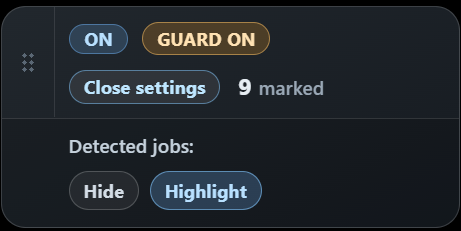
ON/OFFstatus toggle.Guard (ON/OFF): Scroll protection to prevent LinkedIn rate-limits. This is especially important when hiding jobs, as rapid scrolling through hundreds of hidden items can trigger bot-detection filters.
- Two-Layer Detection:
Hide Mode: Automatically vanishes viewed jobs.Highlight Mode: Keeps jobs visible but adds a visual border/badge (useful for manual filtering).
- Draggable Handle: Reposition the badge anywhere on the screen.
- Dynamic Settings Panel: Expandable menu to switch between
HideandHighlightmodes. - Live Counter: Track
N viewedorN hiddenitems in real-time. - Persistence: Remembers your preferences for
ON/OFF,Scroll Guard,Detection Mode, andBadge Position. - Robust Navigation: Full support for LinkedIn’s SPA routing; automatically restarts scanning when you switch pages or collections.
- Multilingual: Intelligent keyword detection across 15+ languages.
Supported Pages
https://www.linkedin.com/jobs/*https://www.linkedin.com/jobs/search/*https://www.linkedin.com/jobs/collections/*
Browser Compatibility
- Chrome + Violentmonkey/Tampermonkey
- Edge + Violentmonkey/Tampermonkey
- Firefox + Violentmonkey/Tampermonkey
Installation
- Install a userscript extension in your browser:
- Chrome/Edge: Tampermonkey or Violentmonkey
- Firefox: Tampermonkey or Violentmonkey
- Import
linkedin-hide-viewed-jobs.user.jsinto the extension. - Save and enable the script.
- Refresh a LinkedIn Jobs page.
Alternative:
- Install directly from
@downloadURL: https://raw.githubusercontent.com/sametcn99/linkedin-hide-viewed-jobs/main/linkedin-hide-viewed-jobs.user.js
GitHub Pages
This repository includes a GitHub Pages setup that renders this README through Jekyll with a dark Bootstrap layout.
Included site assets:
manifestviaicons/site.webmanifestrobots.txtsitemap.xml- favicon and Apple touch icon links from
icons/ - Open Graph, Twitter, canonical, and JSON-LD metadata
Publish flow:
- Open repository settings on GitHub.
- Go to
Pages. - Set
Build and deploymenttoDeploy from a branch. - Select the
masterbranch and/(root)folder. - Save.
Published site URL:
https://sametcn99.github.io/linkedin-hide-viewed-jobs/
Supported Languages
The script supports detection for the following languages:
- English (Viewed, Seen, Applied)
- Turkish (Görüntülenen, Görüntülendi, Başvurulan, Başvurulanlar, Başvuruldu)
- Spanish (Visto, Vistos, Aplicado, Postulado)
- Portuguese (Visualizado, Visualizados, Candidatado, Candidatura)
- French (Vu, Vue, Postulé, Postulée, Candidature)
- German (Angesehen, Gesehen, Beworben)
- Italian (Visualizzato, Visto, Candidata, Candidati, Candidatura)
- Dutch (Bekeken, Solliciteerd)
- Russian (Просмотрено, Откликнулся)
- Polish (Wyświetlono, Aplikowano)
- Swedish (Visad, Sedd, Sökt)
- Chinese (已查看, 已申请, 已檢視, 已申請)
- Japanese (閲覧済み, 応募済み)
- Korean (조회됨, 지원함, 지원 완료)
- Arabic (تمت المشاهدة, تم التقديم)
- Hindi (देखा गया, आवेदन किया गया)
Usage
- Open a LinkedIn Jobs listing page.
- The script scans for viewed cards.
- When
OFF, viewed jobs are not hidden; they are only counted. - When
ON, viewed jobs are hidden. - If rapid downward scrolling is detected while most cards are viewed/hidden, the guard can enter a random cooldown (
5-15s) and slow scroll steps to reduce LinkedIn rate-limit risk. - If guard is triggered again while a cooldown is already active, the new cooldown is added on top of the remaining time (stacked), instead of restarting as separate back-to-back cooldowns.
- During cooldown, pagination controls inside
div.jobs-search-paginationare temporarily disabled (including collections/search pagination buttons). - Drag the badge using the handle on the left to reposition it.
Detection Logic
The script performs detection in multiple layers:
- Card selectors:
li[data-occludable-job-id]and related LinkedIn list item selectors - Footer/marker-focused detection (
VIEWED_MARKER_SELECTORS) - Text,
aria-label, andtitlechecks inside each card - Card-level fallback scan for missed cases
Text matching uses normalize('NFD') plus diacritic removal for more stable multilingual matching.
Customization
Source-of-truth customization lives under src/** and the userscript bundle is generated from that source.
Common knobs:
VIEWED_KEYWORDS: Add more languages/phrasesJOB_CARD_SELECTORS: Card selection scopeVIEWED_MARKER_SELECTORS: Marker selection scopeSTORAGE_KEY: Preference storage keyUI_POSITION_KEY: Badge position storage keyHIDDEN_CLASS: CSS class used for hiding
Limitations
- If LinkedIn changes its DOM structure, selectors may need updates.
- New phrasing variants in some languages may require additions to
VIEWED_KEYWORDS.
Privacy
- The script runs fully on the client side.
- It makes no external API calls.
- It does not send data anywhere.
Contributing
Contributions are welcome.
- Fork the repository.
- Create a feature branch (
feature/your-change) or fix branch (fix/your-change). - Make source changes under
src/**and updateREADME.mdif behavior changes. - Test on LinkedIn Jobs pages to verify detection, badge UI, and toggle behavior.
- Open a pull request with a clear summary, before/after notes, and screenshots when UI is affected.
Guidelines:
- Keep changes focused and minimal.
- Avoid unrelated refactors in the same pull request.
- Preserve compatibility with Tampermonkey/Violentmonkey on Chrome, Edge, and Firefox.
- If you add new language keywords, include only high-confidence terms to reduce false positives.